
Highlight Panel
The application displays the Dashboard page with the following information:
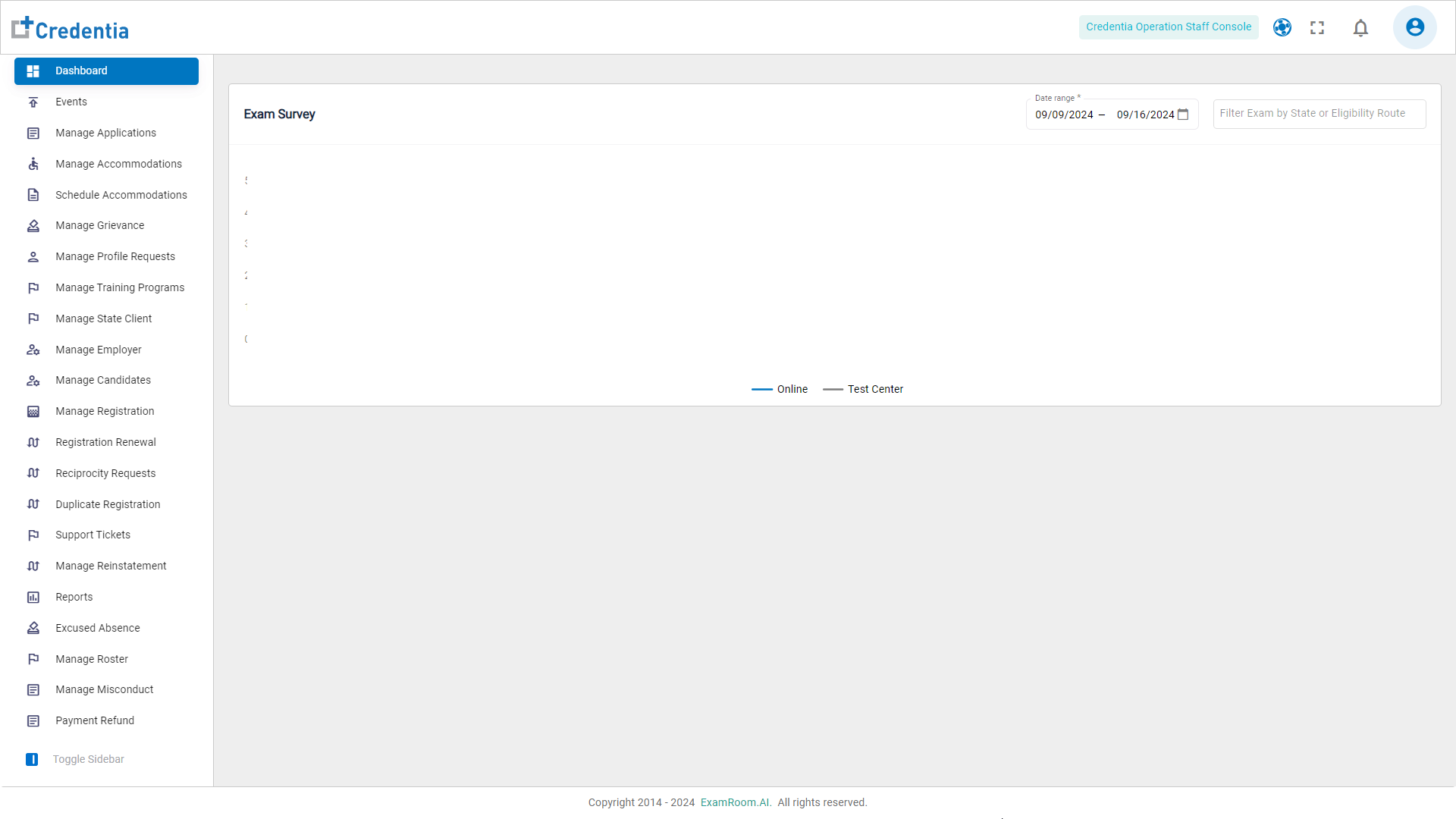
Click the icons in the toolbar at the top of the screen to explore the options available:
| Icon | Type | Description |
 | Full Screen | Click to view the console in full-screen mode. |
 | Notifications | Click to see alerts, reminders, and updates. |
 | Profile | Click to enable efficient account management, with options to edit personal information, and securely log out. |
 | Need Help? | Click Self Help Guides to view all the help guides. |
- To navigate through the console, click the widgets on the left side menu to perform different tasks.
- Dashboard - View an overview of key metrics, updates, and quick links to other sections.
- Events - Manage and track upcoming events, evaluators and activities.
- Manage Applications - View and manage application submissions and statuses.
- Manage Accommodations - Oversee and process accommodation requests and adjustments.
- Manage Grievance - Handle grievance submissions and resolutions.
- Manage Profile Request - Review and manage profile update requests from users.
- Manager Training Programs - view and manage training program details and schedules.
- Manage State Client - Oversee and manage client information and interactions.
- Manage Employer - Administer employer accounts, details, and relationships.
- Manage Candidates - View and manage candidate information, applications, and progress.
- Manage Registration - Handle user registration processes and approvals.
- Registration Renewal - Process registration renewals and ensure timely updates.
- Reciprocity Requests - Manage and approve reciprocity requests from other organizations.
- Duplicate Registration - Handle cases of duplicate registrations and resolve conflicts.
- Support Tickets - Track, manage, and respond to user support inquiries.
- Manage Reinstatement - Oversee reinstatement requests and related processes.
- Reports - Generate and review detailed reports on various activities and metrics.
- Excused Absence - Manage and approve excused absence requests.
- Uploaded Answer Sheet - Review and process uploaded answer sheets from candidates.
- Manage Booklet Inventory - Track and manage the inventory of booklets used in written exams.
- Certified By Test - Administer and track certification tests and their results.
- Manage Misconduct - Handle and resolve misconduct cases within the system.
- Payment Refund - Process payment refund requests and transactions.